
Make a design
Updated .
Pick your TV, pick a look, then change anything. Free, in your phone or computer browser, no account.
Step by step
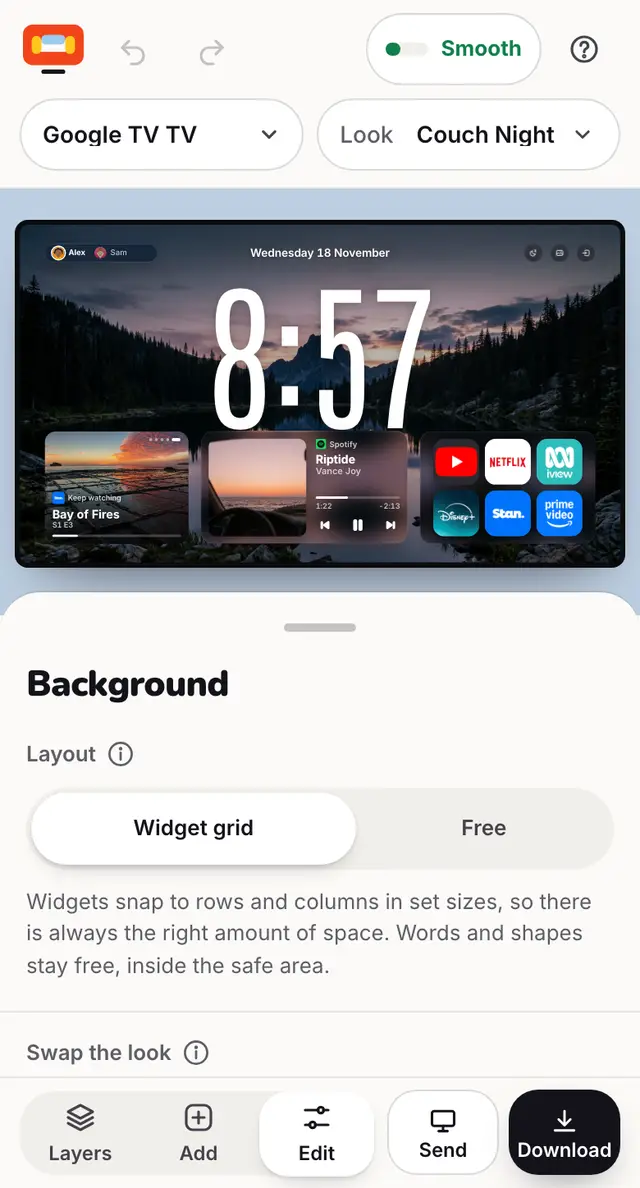
Open couch-tv Studio and pick your TV (or press Not sure, let me design first).
Pick a look to start from, like Couch Night or Family Photo Wall.
Tap anything on the TV to change it. Add brings in more widgets.
Undo and Redo are at the top. Your design stays in this browser as you go.
When it looks right, press Send to my TV to put it on your TV.
Good to know
- The apps you see are examples. On your own TV, your own apps show in their place.
- The speed bar at the top (Smooth) shows how much your design asks of your TV.
- Already made a layout somewhere else? Upload the file and we will check it.
- Making the file with an AI tool? Point it at the design file format and its JSON Schema.
Questions
Do I need an account to design?
No. Designing, downloading and sending to your TV are free with no account.
Where is my design kept?
In your own browser until you send, save or share it.
Still stuck? Ask the helper, or copy a ready question for your own AI.
Related
- Move, resize or remove thingsDrag a widget to move it. Tap it for Size, Swap, Stack, Pin, Duplicate and Delete.
- Add a widgetPress Add, find the widget, tap it. Then tap it on the TV to size it and see what it needs.
- Send a design to your TV with a codePress Send, then Make my code. On the TV: Home settings, couch-tv Studio, Get a design, and type it.