
Move, resize or remove things
Updated .
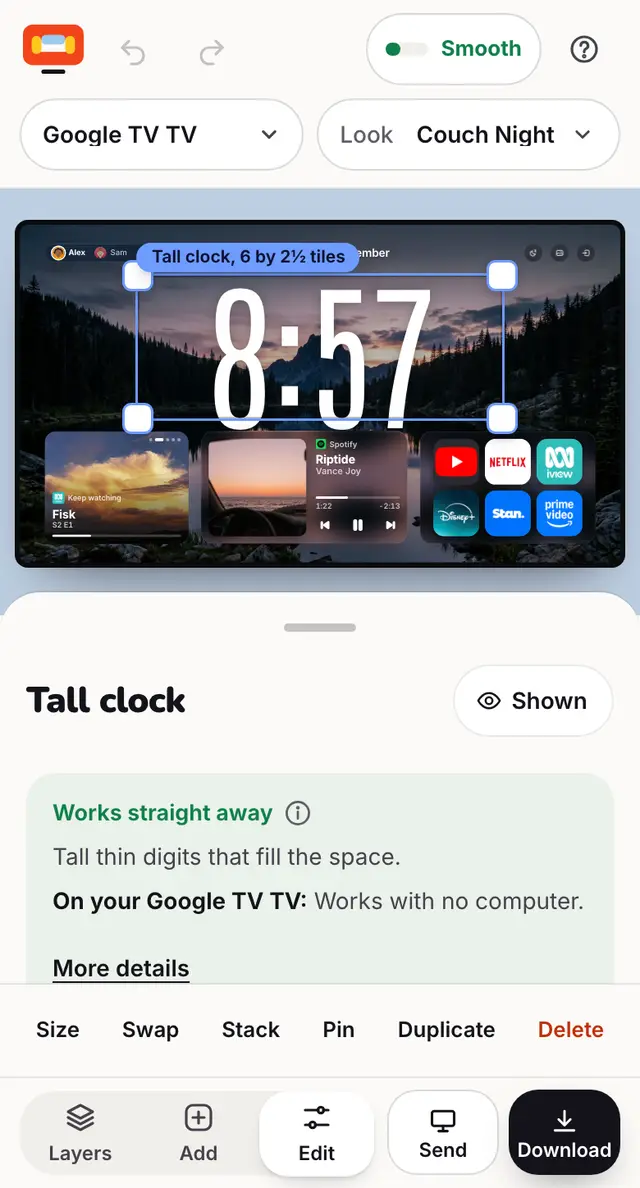
Drag a widget to move it. Tap it for Size, Swap, Stack, Pin, Duplicate and Delete.
Step by step
Drag a widget on the TV to move it. The others make room.
Tap it once. A panel opens with Size, Swap, Stack, Pin, Duplicate and Delete.
Size picks a set size, like iPhone widgets. Swap changes it for another widget in the same place.
Pin keeps a widget still while you drag others. Stack makes a smart stack that takes turns.
Made a mistake? Press Undo at the top.
Good to know
- Layout: Widget grid snaps widgets to rows and columns. Free lets words and shapes sit anywhere inside the safe area.
- On a computer: arrow keys nudge, Delete removes, press ? for every shortcut.
Still stuck? Ask the helper, or copy a ready question for your own AI.