
Bring your couch-tv home into Studio
Updated .
Already use couch-tv from GitHub? On the TV, Home settings, couch-tv Studio, Open this home in couch-tv Studio. Type the code it shows, and your home opens here, ready to change.
Step by step
On the TV, open Home settings (the gear at the end of your apps), then couch-tv Studio. You do not need to turn couch-tv Studio on for this.
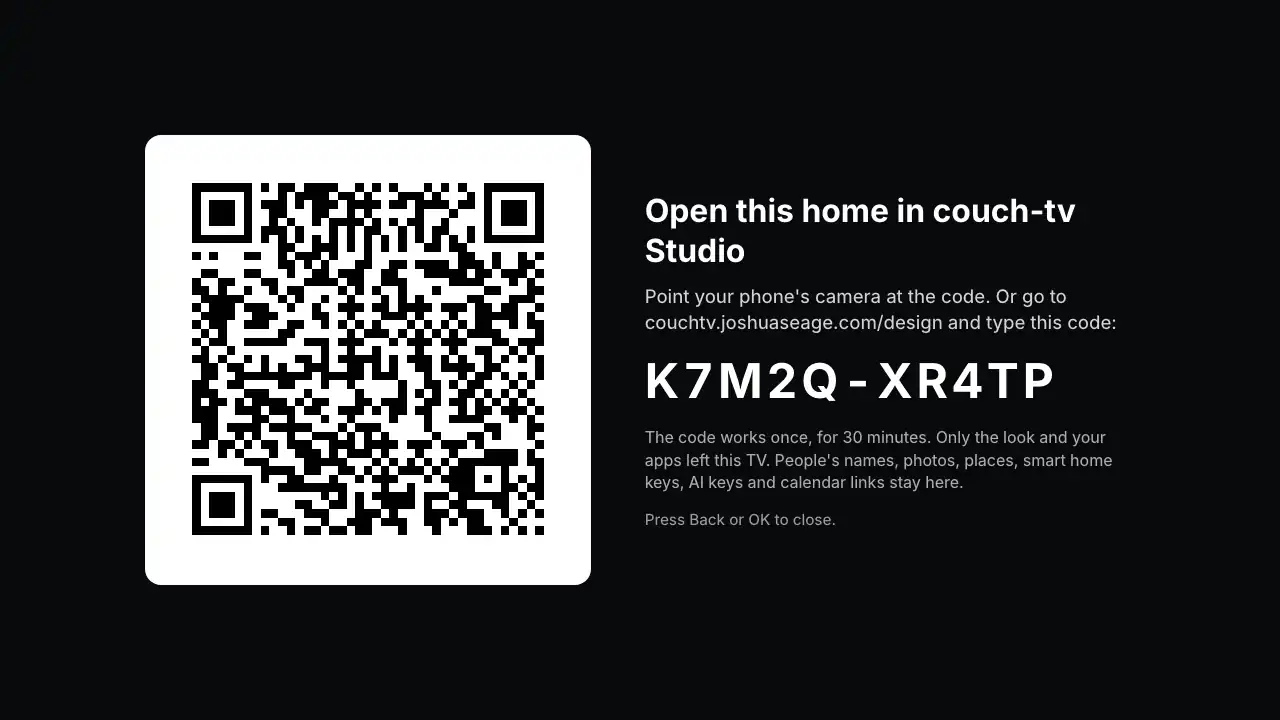
Choose Open this home in couch-tv Studio. On couch-tv 0.13.0 to 0.13.2 it is called Share this home. The TV shows a QR code and a code like K7M2Q-XR4TP.
Point your phone's camera at the QR code. Or open couch-tv Studio on your phone or computer and type the code under Already use couch-tv from GitHub?
Your home opens in the designer: the same apps in the same order, the same scenes, clock, glass and dock. Change anything you like.
Press My designs to keep it in your account, then Send to my TV to put it back on the TV with a new code.
Good to know
- Only the look and your apps leave the TV. People's names, your photos, your place, Home Assistant tokens, AI keys and calendar links never do. If the TV finds anything private in the home, it sends nothing.
- The code works once, for 30 minutes. Ask the TV again for a new one.
- Your TV shows the Classic or OLED look? Designs are drawn over the Night look, so your settings come across on Night.
- No Open this home or Share this home on your TV? It is older than 0.13. Update it (Home settings, Updates), or bring it in from your computer.
Questions
Does my TV change when I do this?
No. The TV only shows a code. Nothing on it changes until you send a design back and say yes on the TV.
Can I go back to my old home?
Yes. On the TV, Home settings, couch-tv Studio, Back to my classic home.
Still stuck? Ask the helper, or copy a ready question for your own AI.
Related
- Bring your couch-tv home in from your computerFor a TV older than couch-tv 0.13: open couch-tv Studio on the computer that set it up, press Open my config.json and pick config.json in your couch-tv folder.
- Send a design to your TV with a codePress Send, then Make my code. On the TV: Home settings, couch-tv Studio, Get a design, and type it.
- Go back to your old homeHome settings, couch-tv Studio, Back to my classic home. Your design is kept for later.